How to run your field work with Hermes Agent
Hermes Agent is an agent harness. It lets you build automations around your business without depending on one model provider like Claude or ChatGPT.
If that sounds like jargon, think of Claude or ChatGPT, but always running in the background, ready to work for you, and not tied to one provider. You can use GPT-5.6 Sol today and switch to an open source model on your own hardware tomorrow.
In this article a fictional landscaping company uses Hermes Agent to document a work site for the back office and to track actual against estimated costs. The result is an agent that runs the site documentation and warns you when a site is not going according to plan.
Summary
- Setup. Create the organization, invite the foreman, connect Hermes to the Simplepush MCP server.
- Give Hermes Agent the plan. Hand Hermes the quote PDF once. It writes a plan file for the site. Then tell it what to keep about each workday.
- Documenting the work site. The daily routine on the foreman's phone: a site login in the morning, photos and notes through the day, a voice report in the evening. One skill and two cron jobs drive it.
- Tracking actual vs. estimated costs. Hermes writes a skill and a script once. Every evening the script does the arithmetic and Hermes posts the comparison to the office, with a warning when hours run ahead of work.
- Where to go next.
Setup
To document a work site and track its costs, you need two things:
- A Simplepush organization, with your foreman's phone connected to it through the Simplepush app.
- A running Hermes Agent. It needs a language model to think with, and the Simplepush MCP server to reach your organization.
Set up your organization in Simplepush
npm install -g @simplepush/cli
sp auth login
The sp auth login command opens the browser. There you create an organization. You can start with a 14-day trial, no credit card needed.
Then invite your foreman.
sp org members invite "Lukas"
info: Invite created for Lukas (role: member).
info: Expires:    2026-09-26 07:19:33 UTC
info: Seats used: 1 / 20
Login code: CWPS-V7AX
Lukas enters the login code in the Simplepush app on his phone. That joins him to your organization.
This is how you send a task to Lukas's phone by hand:
sp task \
  --title "Meier site: login" --tag meier \
  --content "Confirm you are on site. Share your location and tick who is with you today." \
  --location-input "Where are you?" \
  --choice-input "On site today;Ali,Sofia;multi=true" \
  --expires 2h
Once Hermes Agent is connected to the Simplepush MCP server, you no longer send tasks by hand. You tell Hermes what to send and to whom:
Send Lukas a task called "Meier site: login", tagged meier. The text is "Confirm you are on site. Share your location and tick who is with you today." It has two inputs: a location input labeled "Where are you?", and a multiple-choice "On site today" where he can tick Ali and Sofia. Let it expire in two hours.
Setting up Hermes Agent itself is out of scope for this article. If you are not technical, we can set it up with you.
Give Hermes Agent the plan
The plan already exists. Every landscaping firm quotes from a bill of quantities. Each numbered position is one piece of work with a quantity, and behind its unit price sits an estimate in hours.
Some firms keep the calculation in a spreadsheet, others in industry software like DATAflor or HERO. Either way, the quote leaves the office as a PDF.
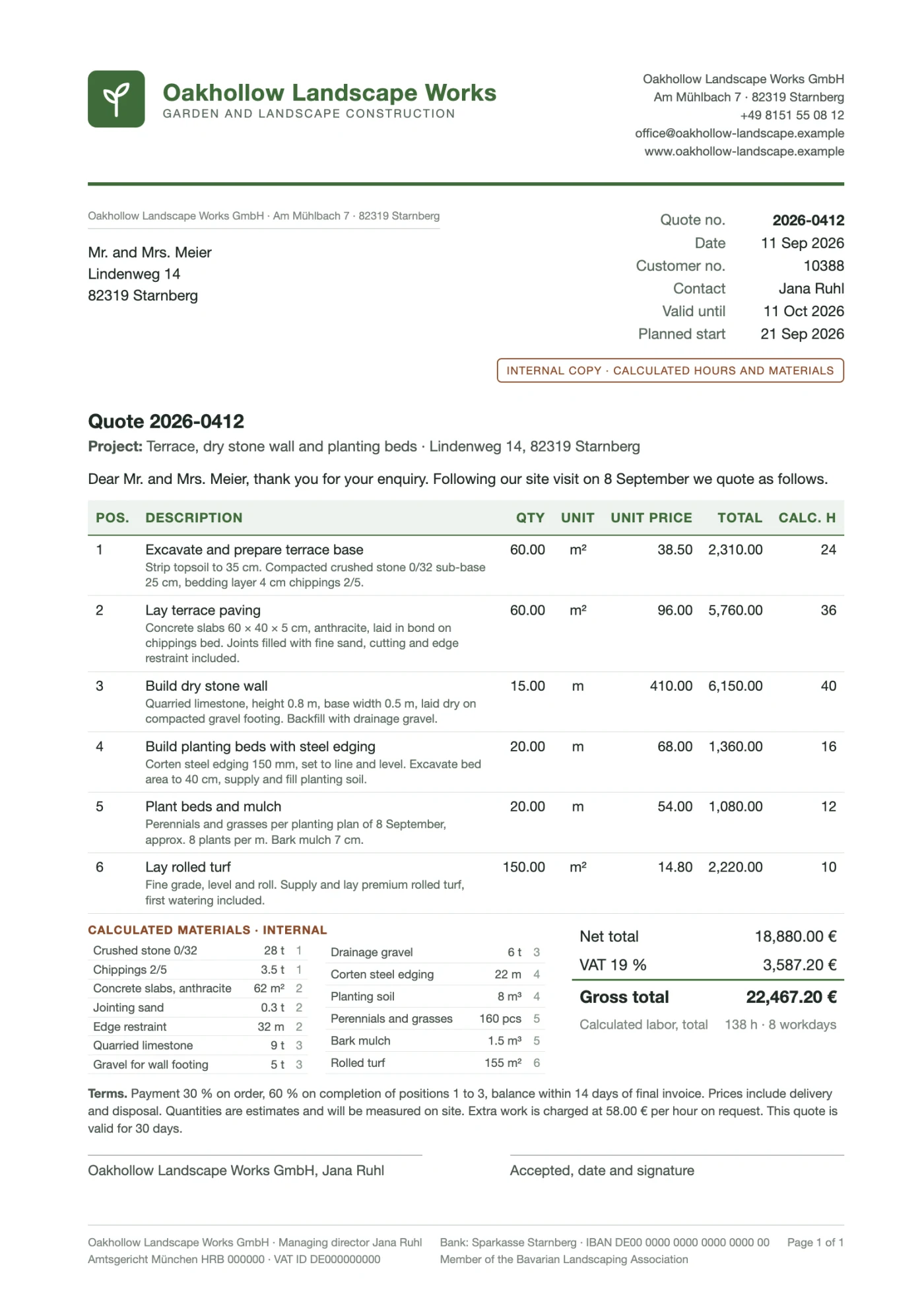
That PDF and one instruction are all Hermes needs. Hand them over in chat:
Here is the quote for the Meier site. Lukas is the foreman, Ali and Sofia are the crew. Start is Monday 21 September. Write one file, sites/meier.yaml, with the site name, the address, the foreman, the crew, the start date, the planned finish, and for every position the fields id, title, description, quantity and planned_hours, where title is the first sentence of the position, such as "Lay terrace paving", and description is the rest. Add the calculated materials with their quantities. Do not create anything else.
Hermes reads the positions and writes the file:
site_name: Meier
address: "Lindenweg 14, 82319 Starnberg"
foreman: Lukas
crew:
  - Ali
  - Sofia
start_date: "2026-09-21"
planned_finish: "2026-09-30"
positions:
  - id: 1
    title: "Excavate and prepare terrace base"
    description: "Strip topsoil to 35 cm. Compacted crushed stone 0/32 sub-base 25 cm, bedding layer 4 cm chippings 2/5."
    quantity: "60.00 m²"
    planned_hours: 24
  - id: 2
    title: "Lay terrace paving"
    description: "Concrete slabs 60 × 40 × 5 cm, anthracite, laid in bond on chippings bed. Joints filled with fine sand, cutting and edge restraint included."
    quantity: "60.00 m²"
    planned_hours: 36
  - id: 3
    title: "Build dry stone wall"
    description: "Quarried limestone, height 0.8 m, base width 0.5 m, laid dry on compacted gravel footing. Backfill with drainage gravel."
    quantity: "15.00 m"
    planned_hours: 40
  # positions 4 to 6 follow the same pattern
materials:
  - name: "Crushed stone 0/32"
    quantity: "28 t"
  - name: "Chippings 2/5"
    quantity: "3.5 t"
  - name: "Quarried limestone"
    quantity: "9 t"
  # ten more materials from the quote
This file is the plan. Firms with industry software can export the pre-calculation instead of the PDF. The file comes out the same.
Everything Lukas sends from the site is the actual. Hermes needs a place to keep it. Tell it once what that place looks like:
Keep everything about a site in a folder sites/. The plan for a site is
sites/<site>.yaml, for examplesites/meier.yaml. For every workday, keep a day record atsites/<site>/<date>.yaml, for examplesites/meier/2026-09-23.yaml, with exactly these fields:task_idandsubtask_id(the ids of the login task and the daily report subtask),login(local time as HH:MM),location_ok(true if the location was within 200 m of the site address),crew(names on site, including the foreman),report(local time as HH:MM),progress(percent per position, keyed by position id),hindrance(the option the foreman picked),extra_work(the text, or null),deliveries(a list of name and quantity, read from delivery notes in the thread),summary(two sentences from the foreman's voice note), andclosed(true once the evening job is done). The morning job creates the record and fillstask_id,subtask_id,login,location_okandcrew. The evening job fills the rest. Never create day records in advance. Write this down insites/README.mdand follow it in every skill that touches a site.
Hermes writes the README. From now on, "today's day record" means one thing. A record from the middle of the job looks like this:
task_id: "tsk_01a0b9c2-4f11-7000-9d2e-3b6c8e5a7f10"
subtask_id: "sub_01a0b9c2-6a03-7000-8c41-52d7e9b0a3c4"
login: "08:02"
location_ok: true
crew:
  - "Lukas"
  - "Ali"
  - "Sofia"
report: "16:48"
progress:
  2: 60
  3: 20
hindrance: "Other"
extra_work: null
deliveries:
  - name: "Quarried limestone"
    quantity: "9 t"
summary: "Wall is slower than expected, the stone is irregular and needs sorting. Terrace paving on track."
closed: true
The site file and the day records are plain files in Hermes's working directory. You can open them any time in the file browser of Hermes Desktop. Hermes compares the plan with the records. The rest of this article is about filling them.
Documenting the work site
Lukas is the foreman on the Meier site. Ali and Sofia are his crew. The day has three parts: a login in the morning, a thread through the day, and a report in the evening. One skill and two cron jobs drive all three. The skill holds the procedure. The cron jobs only say when to run it.
The morning login
A Hermes skill is a procedure that Hermes writes down and reuses. You create one by describing it in chat:
Create a skill called site-login. When run for a site: read the site file and today's date. Send the foreman a task titled
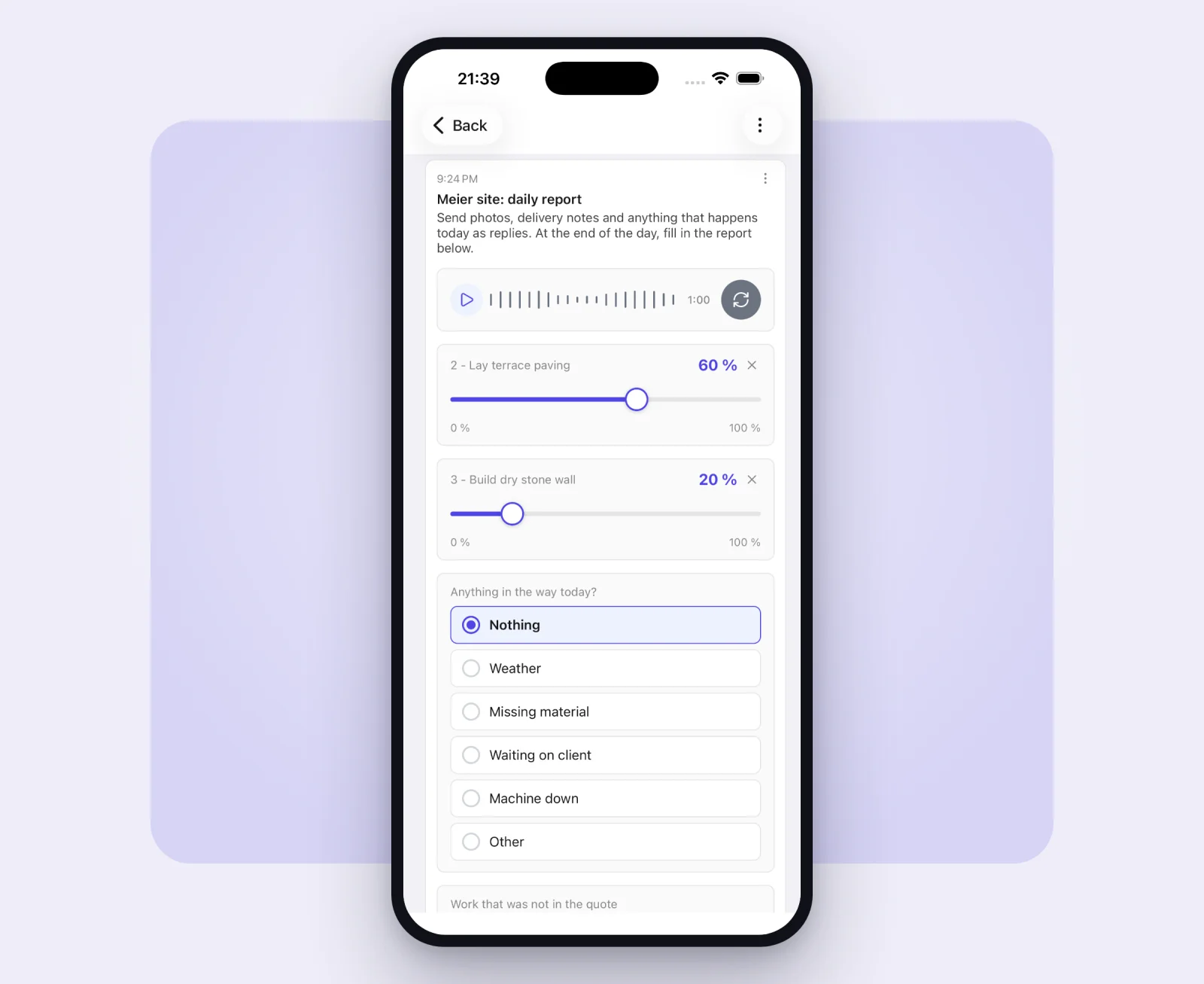
<Site> site: login, tagged with the site name, with the text "Confirm you are on site. Share your location and tick who is with you today.", a location input labeled "Where are you?", and a multi-choice "On site today" listing the crew from the site file. Let it expire at 10:00. Wait up to 15 minutes for the answer. If it has not arrived, keep checking with get_task_answer every five minutes until 10:00. When it arrives, check the location against the site address, create today's day record and fill in the login time, the location check and the crew. Then append a subtask titled<Site> site: daily reportwith the text "Send photos, delivery notes and anything that happens today as replies. At the end of the day, fill in the report below.", a voice recording input "How did the day go?", one percent slider per position that is not yet at 100 percent, a choice "Anything in the way today?" with the options Nothing, Weather, Missing material, Waiting on client, Machine down, Other, and an optional text "Work that was not in the quote". Keep the reply thread open.
Hermes writes the skill into its working directory, next to the site files. The cron job is then one sentence:
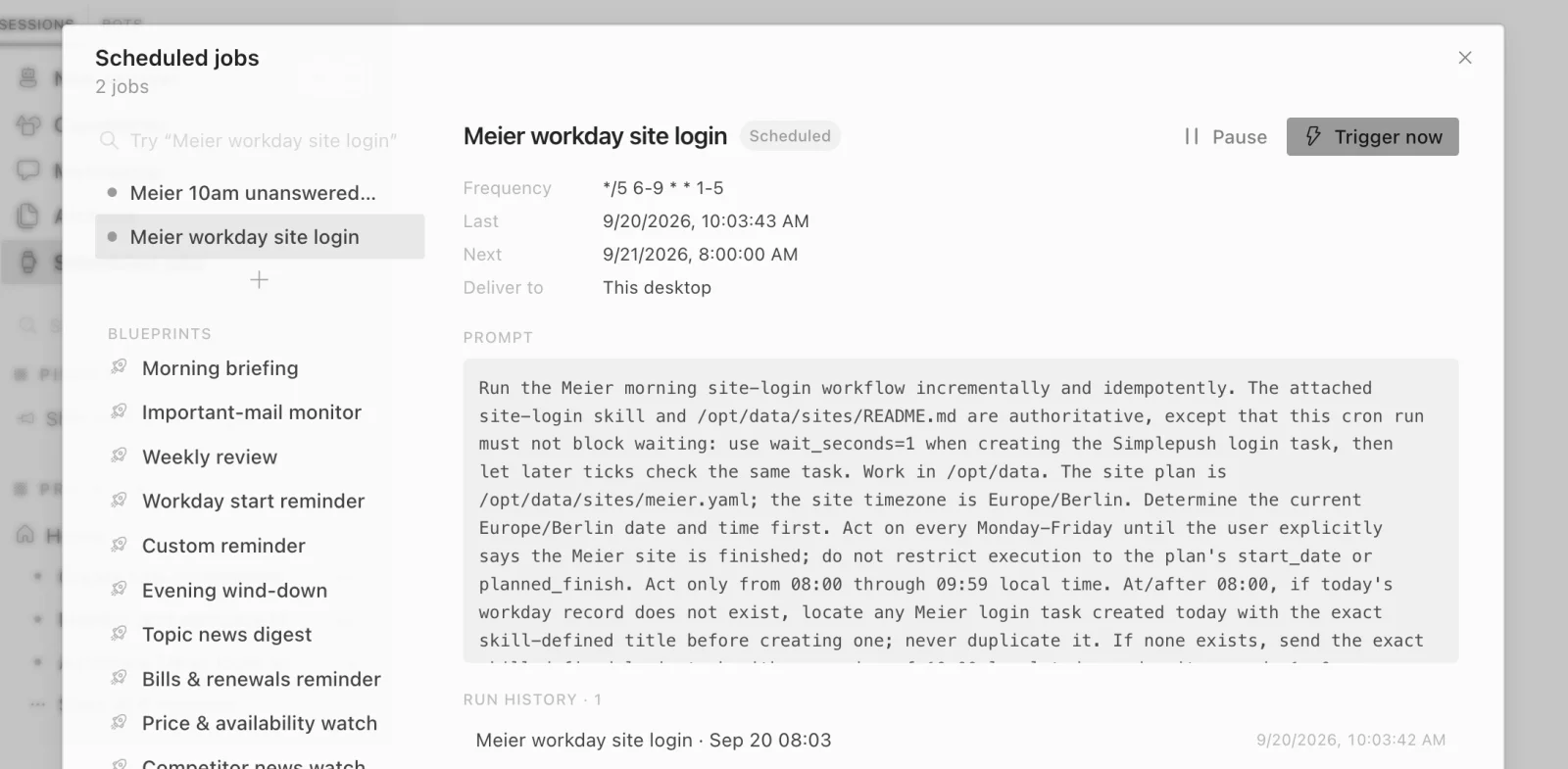
Every workday at 8:00, run the site-login skill for Meier, until I tell you the site is finished. Do not limit the job to the planned dates. If nobody has answered by 10:00, tell me on Telegram.
Hermes has a cron tool of its own, so that sentence is all it takes. Hermes confirms the schedule and the prompt it saved. The job also appears on the Cron page of Hermes Desktop. There you can pause it, edit it, or trigger it right now and watch the task arrive on the phone.
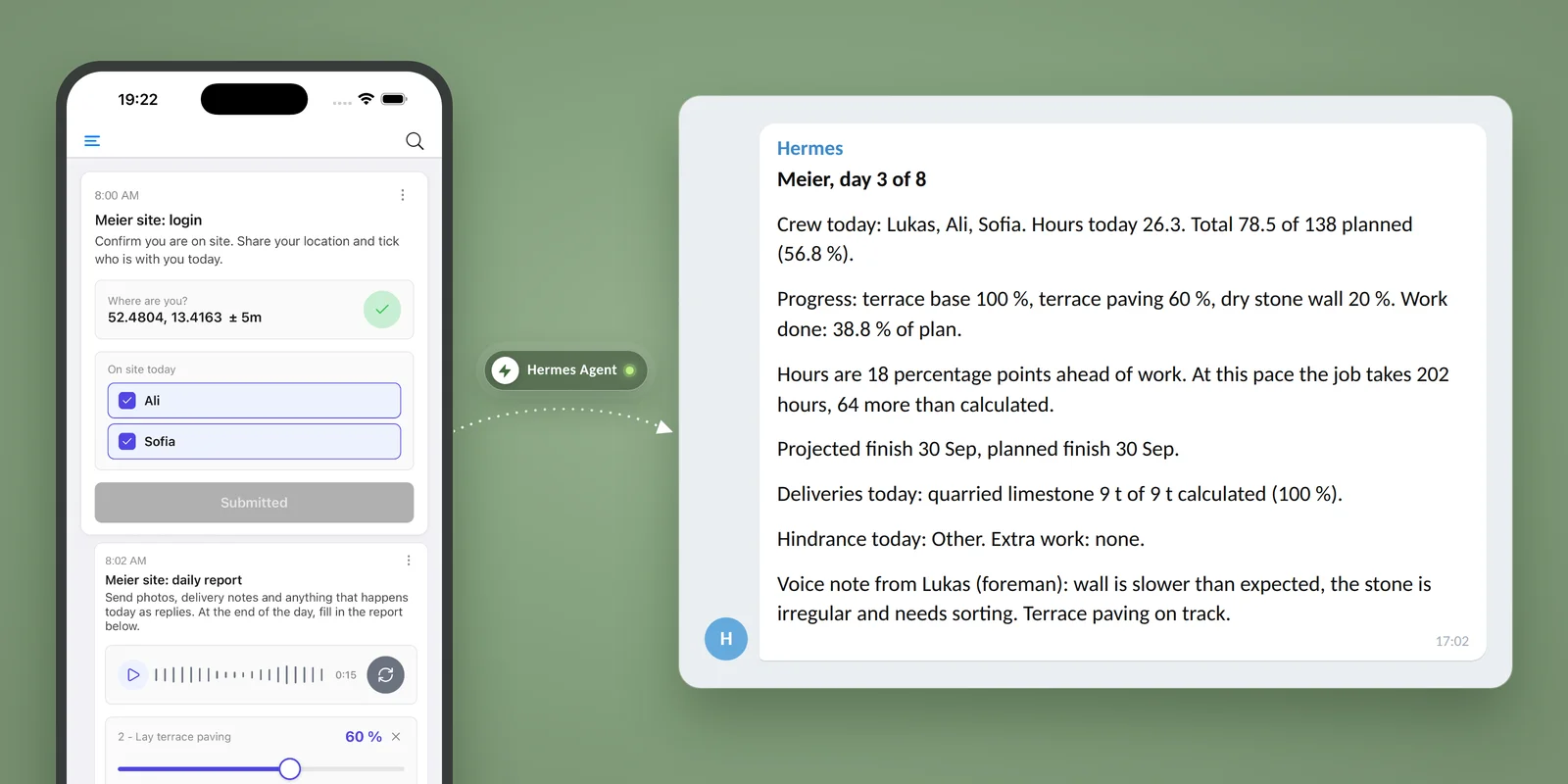
At 8:00 Hermes sends the task and waits for the answer. On the phone it is a title, one sentence, a button that captures the location, and two checkboxes. Lukas is done by 8:02.
With the answer in hand, Hermes checks that the location is within 200 meters of the site address, notes that Ali and Sofia are there, and creates today's day record with the login time. The site clock is running. In the evening, the crew size turns site hours into labor hours.
The workday thread
Right after the login, the skill appends a subtask to the same task. It carries the evening report and keeps a reply thread open all day. This is what Hermes sends:
{
  "append_token": "at_...",
  "title": "Meier site: daily report",
  "content": "Send photos, delivery notes and anything that happens today as replies. At the end of the day, fill in the report below.",
  "inputs": [
    { "type": "voiceRecording", "description": "How did the day go?" },
    { "type": "slider", "description": "2 - Lay terrace paving", "min": 0, "max": 100, "step": 1, "unit": "%", "defaultValue": 25 },
    { "type": "slider", "description": "3 - Build dry stone wall", "min": 0, "max": 100, "step": 1, "unit": "%", "defaultValue": 0 },
    { "type": "choice", "description": "Anything in the way today?", "options": ["Nothing", "Weather", "Missing material", "Waiting on client", "Machine down", "Other"] },
    { "type": "text", "description": "Work that was not in the quote", "required": false }
  ],
  "reply": "sticky"
}
There is one slider per open position. Hermes builds them from the site file and the earlier day records, so each slider starts where the last report left it. On day one there are two sliders. In the second week there is one.
Through the day Lukas replies to that subtask with whatever happens. A photo of the delivery note when the stone arrives. A picture of the drainage pipe they found in the line of the wall. A voice note that the client wants the bed a meter longer. Nothing is typed. Each reply lands in the thread with who sent it and when. Hermes reads the quantities off the delivery note and files the pipe as a hindrance before anyone asks.
The evening report
At the end of the day Lukas opens the subtask, records a minute on how the day went, drags the terrace slider to 60, taps "Nothing" and submits. That stops the clock.
Hermes is not told when the report lands. A second cron job checks for it every 15 minutes from 16:00 and runs the comparison. That job, and the skill it runs, are in Tracking actual vs. estimated costs.
The knowledge base that grows
Every login, reply, photo and report stays in Simplepush, tied to the site, the person and the time. After a few weeks that record answers questions nobody wrote a report for. You ask Hermes in chat, and Hermes asks Simplepush:
You: What was delivered to the Meier site, and when?
Hermes: Three deliveries. Crushed stone 28 t on Monday 9:40, quarried limestone 9 t on Wednesday 10:15, concrete slabs 62 m² on Thursday 8:30. All within the calculated quantities. Here are the photos of the delivery notes.
Under the hood that is one search_knowledge call for "delivery" on the Meier tag, then download_attachment for the notes. Other questions the record can answer:
- "Which sites had 'waiting on client' as a hindrance this month?" A query over the daily reports of every site.
- "Show me every photo of the dry stone wall." A search by word. The photos come back inline.
- "Where was the crew on Tuesday at 10?" The login location, and any reply that carried one.
- "How many hours did dry stone walls take against the quote this year?" The input for the next quote, and the end of repeating the same mistake.
None of this needs a form that asks for it in advance. The record is a side effect of the day.
Tracking actual vs. estimated costs
The evening job says "run the comparison". Hermes needs to know what that means, and it has to mean the same thing every evening. So the procedure goes into a skill, and the arithmetic goes into a script. You ask for both once, in chat:
Create a skill called site-comparison. First write a script sites/compare.py that reads a site file and the site's day records and prints the planned-versus-actual comparison as YAML: hours used and planned, share of hours used and share of work done, a warning when hours are more than 15 points ahead of work, the projected total hours at the current pace, the projected finish date, deliveries so far against the calculated materials, and the hindrances and extra work so far. Then write the skill: fetch today's report with get_task_answer, write the slider values, hindrance, extra work and report time to today's day record, summarize the voice note in two sentences, run compare.py, and post the result to Telegram in this format:
Site, day N of M. Site hours and crew. Hours today, total of planned, percent. Progress per position, work done as percent of plan. Warning line if hours run ahead of work, with the projected total hours against the calculated hours. Projected finish against plan. Deliveries today against the calculated quantity. Hindrances and extra work today. The foreman's summary in one or two sentences.
The skill must use the script's numbers and never compute them itself.
Hermes writes two files into its working directory. The skill is the procedure: a page of plain text that says what to fetch, what to write down, what to run, and how to word the result. The script is a Python file that reads the site file and the day records and prints the numbers. Both are ordinary files. Open them in the file browser of Hermes Desktop, read them, and change the wording of the report if you like. Hermes follows the file.
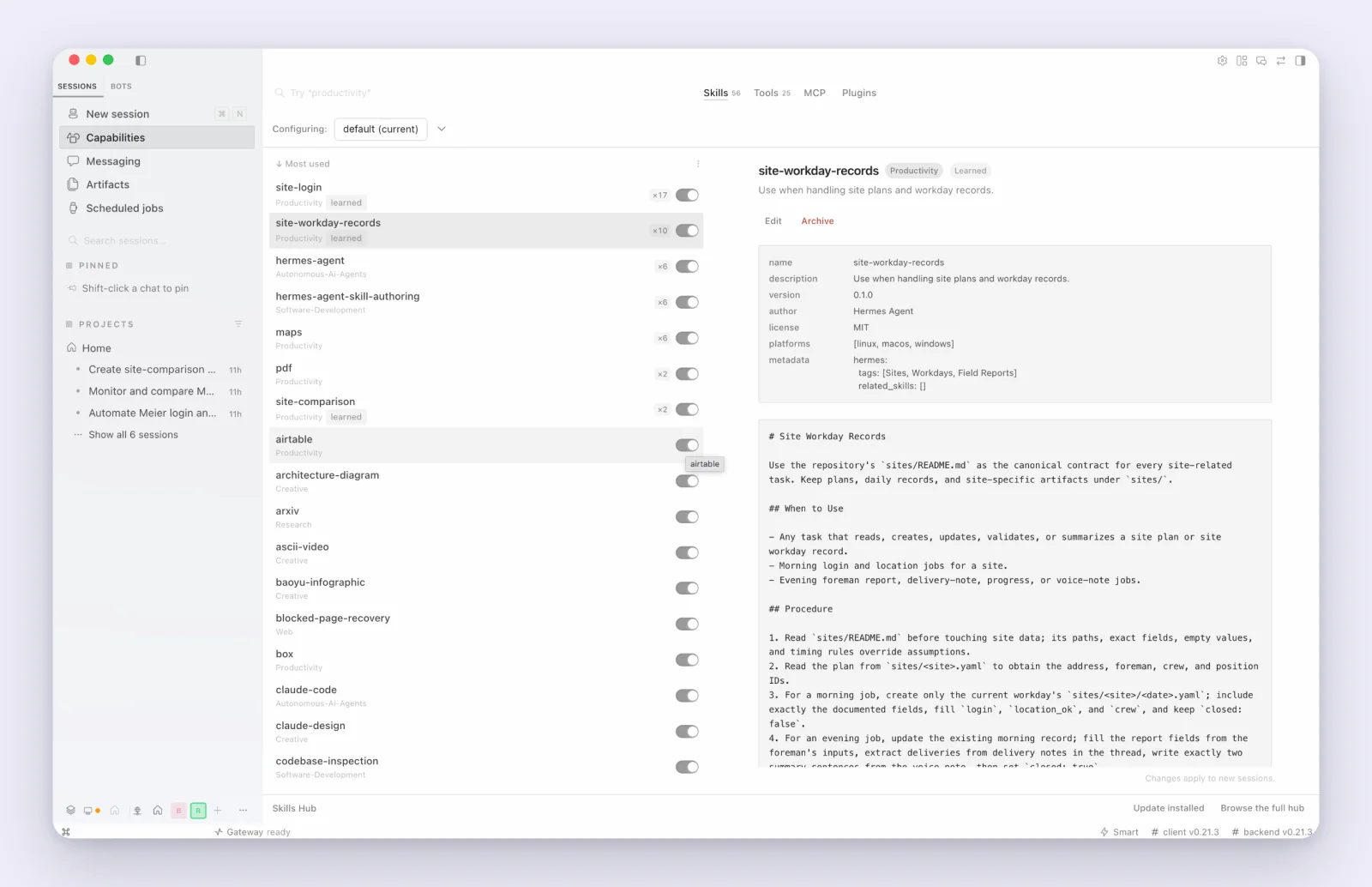
The split matters. A language model is good at reading a delivery note and summarizing a voice note. It is bad at adding up hours. The script does the adding, the same way every evening. Hermes turns the numbers into a message.
The evening cron job is again one sentence:
Every 15 minutes between 16:00 and 19:00 on workdays, check whether today's Meier report is in. If it is and today's day record is not closed yet, run the site-comparison skill for Meier. Otherwise say nothing. Keep this job until I tell you the site is finished. Do not limit it to the planned dates.
The office gets this on Telegram:
Meier, day 3 of 8
Crew today: Lukas, Ali, Sofia. Hours today 26.3. Total 78.5 of 138 planned (56.8 %).
Progress: terrace base 100 %, terrace paving 60 %, dry stone wall 20 %. Work done: 38.8 % of plan.
Hours are 18 percentage points ahead of work. At this pace the job takes 202 hours, 64 more than calculated.
Projected finish 30 Sep, planned finish 30 Sep.
Deliveries today: quarried limestone 9 t of 9 t calculated (100 %).
Hindrance today: Other. Extra work: none.
Wall is slower than expected, the stone is irregular and needs sorting. Terrace paving on track.
The line in bold is why the routine exists. The crew is on schedule by the calendar and 46 percent over on hours, because three people spend full days on a wall that was calculated for less. On day three the office knows that. There is still time to talk to the client about the stone, or to change who builds the wall. At invoicing it would have been a number to explain.
The same two skills serve every site. A second site is a second site file and the same two cron jobs with another site name. After a few sites, the day records also answer the question the quote could not: how long a dry stone wall really takes per meter, with your crews and your stone. That number goes into the next quote.
Where to go next
The first step is the setup above: create the organization, invite the foreman, install the app on the foreman's phone. Everything else follows from that.
- Organizations. Members, roles, and what Hermes can see and send when it signs in as the organization admin.
- Encryption. This is where Hermes Agent pays off twice. Point it at an open source model on a machine in your own office, and the whole routine runs without a readable word leaving your premises. The phones encrypt, your machine decrypts, and no model provider ever sees a site, a name or a photo.
- Sending tasks. The full set of inputs. A cleaning crew's daily report wants a photo per room. An electrician's wants a file input for the test certificate. The routine stays the same, the questions change.
A second site is a second site file. A weekly roll-up across all sites is one more cron job and a sentence in the skill. After a season, the day records hold the number no quote ever had: how long each kind of work takes with your crews.
If you would rather not set this up yourself, write to us. We will set it up with you.