Getting Started
Simplepush connects phones with scripts, agents, and workflows, in both directions. Send a question to a phone and get the answer back as structured data. Or send text, photos, voice notes and files from the phone into anything that can consume an event stream.
This guide covers personal use, where everything runs on your own account. Teams can also use Simplepush as an organization. An organization is a shared namespace with managed members, admin-controlled topics, and an organization API key for scripts and agents.
Download the app
There's no registration, no signup form, no account to manage. Download the app and you're ready.


Your API token
The app generates an API token for your account. You find it in the app settings under API Token. It authenticates everything you send from the command line, a script, or an agent. Export it once:
export SP_API_TOKEN="your-token"The CLI and the curl examples below read $SP_API_TOKEN. The SDKs take the token as a constructor argument.
Organizations authenticate differently. Scripts use the organization API key (Api-Key header, OrgClient in the SDKs). The CLI uses an sp auth login session. See Organizations.
Install
npm install -g @simplepush/clipip install simplepushnpm install @simplepush/sdkTasks
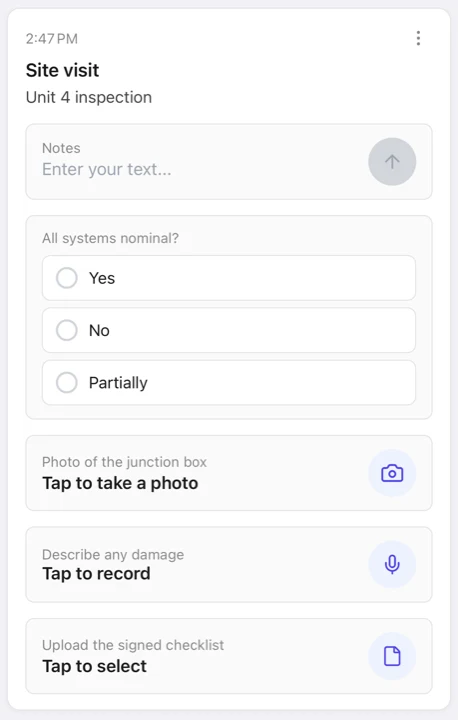
Send a task with no target and it goes to your own devices as a push notification. When you answer it on the phone, the answer comes back to your code.
# --wait keeps the command running until you answer, then prints it
sp task --title "Deploy v2.1.0?" -c "Approve,Deny" --wait
# ...tap Approve on your phone...
# Approve# Wait: true holds the connection open until you answer; the body is the answer
curl -X POST https://api.simplepu.sh/v1/tasks \
-H "API-Token: $SP_API_TOKEN" \
-H "Title: Deploy v2.1.0?" \
-H "Choice-Input: Approve,Deny" \
-H "Wait: true"import asyncio
from simplepush import Client, ChoiceInput, TaskCompleted
client = Client(api_token="YOUR_API_TOKEN")
task = client.send_task(
title="Deploy v2.1.0?",
inputs=[ChoiceInput(options=["Approve", "Deny"])],
)
async def main():
async for event in task.inputs(timeout=600):
if isinstance(event, TaskCompleted):
print(event.uploads) # [ChoiceUpload(index=0, value="Approve")]
asyncio.run(main())import { Client } from "@simplepush/sdk";
const client = new Client({ apiToken: "YOUR_API_TOKEN" });
const task = await client.sendTask({
title: "Deploy v2.1.0?",
inputs: [{ type: "choice", options: ["Approve", "Deny"], required: true }],
});
for await (const item of task.inputs({ idleMs: 600_000 })) {
if (item.kind === "taskCompleted") console.log(item.uploads);
}That is the whole loop. Your code asks, a person answers, and the answer comes back to your code. Everything else builds on it: richer inputs (sliders, action buttons, photo and voice answers), more recipients, and streaming collection instead of a blocking wait. See Tasks.
Files in, files out
Tasks carry files in both directions. You can attach a file to the send, and you can ask for a photo, voice recording, or file back. Uploaded answers come back as downloads: read() / save() handles in the SDKs, files saved to disk with --save-files on the CLI, and a presigned URL on curl.
sp task --title "Inspect the meter" -f ./manual.pdf \
  --photo-input "Photo of the meter" --format json \
| sp collect --inputs --save-files ./inbox --until complete# One file rides as the request body; Wait: true returns the photo
# answer as a presigned download URL
curl -X POST https://api.simplepu.sh/v1/tasks \
-H "API-Token: $SP_API_TOKEN" \
-H "Title: Inspect the meter" \
-H "Attachment: manual.pdf" \
-H "Photo-Input: Photo of the meter" \
-H "Wait: true" \
--data-binary @./manual.pdfimport asyncio
from simplepush import Client, PhotoInput, TaskCompleted, PhotoUpload
client = Client(api_token="YOUR_API_TOKEN")
task = client.send_task(
title="Inspect the meter",
files=["./manual.pdf"],
inputs=[PhotoInput(description="Photo of the meter")],
)
async def main():
async for event in task.inputs(timeout=600):
if isinstance(event, TaskCompleted):
for u in event.uploads:
if isinstance(u, PhotoUpload):
print(await u.save("./inbox"))
asyncio.run(main())import { readFileSync } from "node:fs";
import { Client } from "@simplepush/sdk";
const client = new Client({ apiToken: "YOUR_API_TOKEN" });
const task = await client.sendTask({
title: "Inspect the meter",
files: [{ filename: "manual.pdf", data: readFileSync("./manual.pdf") }],
inputs: [{ type: "photo", description: "Photo of the meter", required: true }],
});
for await (const item of task.inputs({ idleMs: 600_000 })) {
if (item.kind === "taskCompleted") {
for (const u of item.uploads) {
if (u.kind === "photo") console.log(await u.save("./inbox"));
}
}
}Topics
A topic is a named set of devices. Sending to a topic reaches everyone subscribed to it. Topics are how you go from "ping myself" to "ask my family" or "ask the whole crew". Anyone who knows a topic's value can join it, so treat the value like a secret. Use end-to-end encryption or write-protection when it matters. See Topics.
Submissions
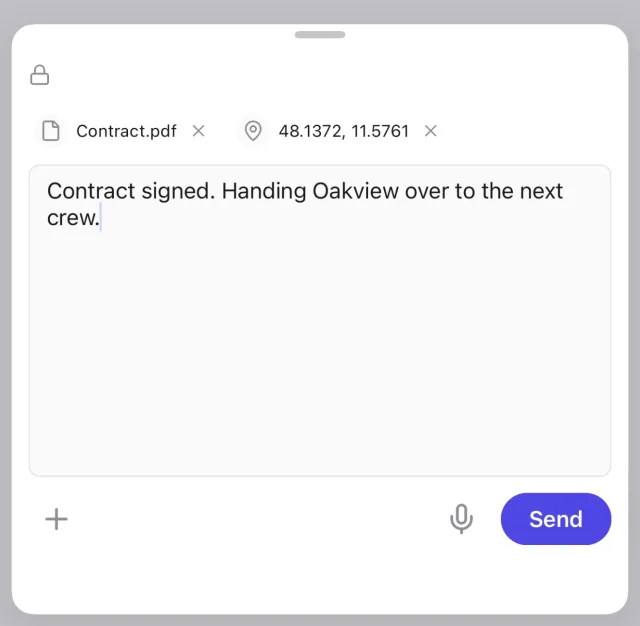
Submissions work in the opposite direction. Open the app and send text, a photo, a voice memo, your location, or a file. Nobody has to ask first. A listening script receives it within seconds.
sp collect --submissions --until count:1import asyncio
from simplepush import Client
client = Client(api_token="YOUR_API_TOKEN")
async def main():
async for s in client.submissions():
if s.body:
print("text:", s.body.text)
if s.photo:
await s.photo.save("./inbox")
asyncio.run(main())import { Client } from "@simplepush/sdk";
const client = new Client({ apiToken: "YOUR_API_TOKEN" });
for await (const s of client.submissions()) {
if (s.body) console.log("text:", s.body.text);
if (s.photo) await s.photo.save("./inbox");
}See Submissions.
Notifications
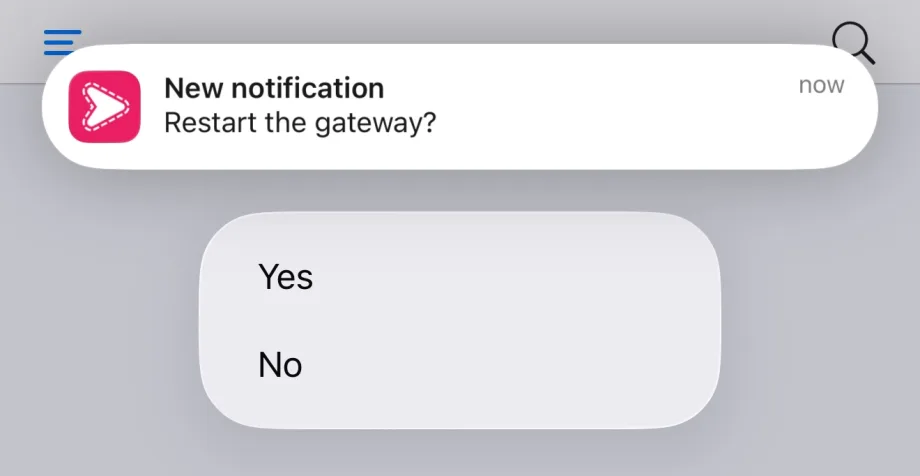
A notification is fire-and-forget. It pops up on your devices, and nothing is saved once it is dismissed. Use it for an alert or a heads-up, where a task would be too much.
sp notify --title "Reminder" --content "Standup in 5 minutes"curl -X POST https://api.simplepu.sh/v1/notifications \
-H "API-Token: $SP_API_TOKEN" \
-H "Title: Reminder" \
-H "Content: Standup in 5 minutes"from simplepush import Client
client = Client(api_token="YOUR_API_TOKEN")
client.send_notification(title="Reminder", content="Standup in 5 minutes")import { Client } from "@simplepush/sdk";
const client = new Client({ apiToken: "YOUR_API_TOKEN" });
await client.sendNotification({ title: "Reminder", content: "Standup in 5 minutes" });Notifications can also carry an image, a single input, or action buttons, and go to topics and teams just like tasks. See Notifications.
Agents and prompts
From claude.ai, Claude Code, Cursor, or any MCP client, an assistant uses the same system through the MCP server. Scripts and agent harnesses use the CLI. Sending is only half of it. Every task, answer, reply, decline, and submission stays queryable afterwards. So the system also works as a knowledge base of the work: what was asked, who answered what, what is still open, and what the field reported on its own.
# hosted connector: sign in with OAuth, nothing to install
claude mcp add --transport http simplepush https://mcp.simplepu.sh/mcp

# self-run, personal: your API token from the app
claude mcp add simplepush --env SP_API_TOKEN=your-token -- npx -y @simplepush/mcp

# organization: an integration token from `sp integration create`
claude mcp add simplepush --env SP_INTEGRATION_TOKEN=spi_... -- npx -y @simplepush/mcpsp get tasks --status expired --since 7d # every task that expired unanswered this week
sp get tsk_… # one task with all its answers and subtasks
sp get submissions --since 24h # what people reported on their ownWith the MCP server connected, the assistant answers questions like "Which tasks expired unanswered this week?", "Send Anna a task to check pump 3 and wait for her answer", or "Catch me up on what came in from site 3 today" with the query_tasks, send_task, and get_activity tools. The CLI's sp get prints the same data as JSON lines for scripts and agent harnesses. On personal accounts, querying needs a subscription. Sending stays free.
Next steps
- Sending Tasks: all input types, attachments, delivery modes
- Notifications: fire-and-forget pushes, media, priority levels
- Receiving Data:
sp collect, event streams, and the SDKs - CLI Tool: every
spcommand and flag - MCP Server: connect an agent, send tasks, query the record of the work
- Python SDK / TypeScript SDK: the full client APIs
- Encryption: end-to-end encryption for everything above
- Organizations: teams with managed members and topics