Notifications
A notification is a fire-and-forget message. It pops up in the notification center of every receiving device. Nothing is saved on the phone. Once the recipient dismisses it, no record remains. Send a task instead when the recipient should be able to find the message later, or when you need more than one input.
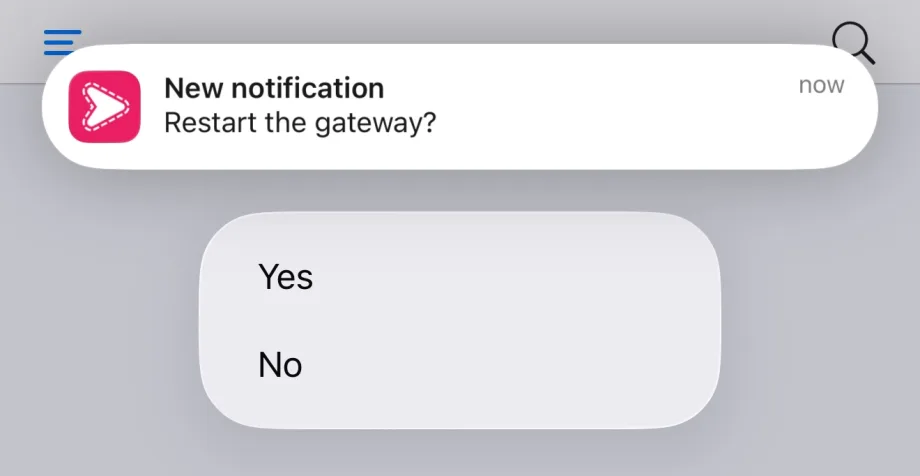
A notification carries a title, content, at most one media attachment (an image or an audio clip), a link, and at most one input. The input is a text input, a choice input, or a set of action buttons (for example Accept and Deny). iOS shows up to four buttons, Android shows three.
API endpoint
POST /v1/notifications, authenticated with API-Token (personal) or Api-Key (organization). See the cURL guide for header-based sends. POST /v1/notifications/json is the same endpoint with a JSON body.
Delivery modes: independent (default) and shared
When a notification goes to more than one recipient, each recipient gets their own instance by default. Every instance has its own id and its own reply. The instances form a group. The send returns a grpntf_ group id plus one ntf_ id per recipient.
Shared mode is the alternative. It sends one notification that every recipient sees and answers together. The first reply completes it for everyone. Use it when you want a single answer from whoever answers first, rather than one answer per person.
- SDKs: pass
shared=True(Python) /shared: true(TypeScript). The default returns a group handle. Shared mode returns a single notification handle. - CLI: add
--sharedtosp notify. - curl: add a
Shared: trueheader. TheX-Notification-Idresponse header is thegrpntf_group id by default, or thentf_id in shared mode.
Send to your own devices
Omit the topic (and any organization target) to send the notification to every device on your own account. It is encrypted automatically when your client has a personal password configured. Otherwise it is sent as plaintext.
sp notify --title "Reminder" --content "Standup in 5 minutes"from simplepush import Client
client = Client(api_token="YOUR_API_TOKEN", passwords="personal-secret")
client.send_notification(title="Reminder", content="Standup in 5 minutes")import { Client } from "@simplepush/sdk";
const client = new Client({ apiToken: "YOUR_API_TOKEN", passwords: "personal-secret" });
await client.sendNotification({ title: "Reminder", content: "Standup in 5 minutes" });curl -X POST https://api.simplepu.sh/v1/notifications \
-H "API-Token: $SP_API_TOKEN" \
-H "Title: Reminder" \
-H "Content: Standup in 5 minutes"Media: images and audio
A notification can show one media item in the native notification, alongside the text and any input.
- Images (
image/jpeg,image/png,image/gif) render on iOS and Android. - Audio (AIFF, WAV, MP3, M4A) plays inline on iOS only. Android ignores audio.
Provide media as a URL, which the recipient's device fetches. In the SDKs you can also pass a local file, which is uploaded (and encrypted when the send is encrypted). Uploads follow the iOS attachment limits: images up to 10 MB, audio up to 5 MB. image and audio are mutually exclusive.
# The CLI carries media as URLs; file uploads are SDK-only.
sp notify -t alerts --title "New chart" --content "Nightly report" \
--image https://example.com/chart.pngfrom simplepush import Client
client = Client(api_token="YOUR_API_TOKEN")
# Image as a URL, fetched by the recipient's device
client.send_notification(topic="alerts", title="New chart", content="Nightly report",
image="https://example.com/chart.png")
# Image uploaded from disk
client.send_notification(topic="alerts", title="Signed", content="Contract attached",
image="./chart.png")import { Client } from "@simplepush/sdk";
const client = new Client({ apiToken: "YOUR_API_TOKEN" });
await client.sendNotification({
topic: "alerts", title: "New chart", content: "Nightly report",
image: "https://example.com/chart.png",
});
// Uploaded file: { filename, data, contentType? }
await client.sendNotification({
topic: "alerts", title: "Signed", content: "Contract attached",
image: { filename: "chart.png", data: bytes },
});The header-based curl endpoint does not carry media. Use an SDK or sp notify.
Link
A notification can carry one link, shown as an Open link button on the notification. On Android the button sits under the expanded notification. On iOS it appears when the notification is long-pressed or pulled down.
Any URL scheme works. An https:// link opens the browser. An app's deep link, such as unifi-protect://protect/devices/..., opens that app.
sp notify -t cameras --title "Motion" --content "Front door" \
-l "unifi-protect://protect/devices/abc123"client.send_notification(topic="cameras", title="Motion", content="Front door",
link="unifi-protect://protect/devices/abc123")await client.sendNotification({
topic: "cameras", title: "Motion", content: "Front door",
link: "unifi-protect://protect/devices/abc123",
});curl -X POST https://api.simplepu.sh/v1/notifications \
-H "API-Token: $SP_API_TOKEN" \
-H "Topic: cameras" \
-H "Title: Motion" \
-H "Content: Front door" \
-H "Attachment: unifi-protect://protect/devices/abc123"A link and an input are mutually exclusive, because the input's buttons take the button slots. A send with both is rejected. Tapping the notification body still opens Simplepush.
Priority
priority sets how loudly the push interrupts, from 1 to 5. Default 3. Tasks and subtasks take the same field.
| Level | iOS | Android |
|---|---|---|
| 1 | Silent, Notification Center only | Silent, no status bar icon |
| 2 | Silent, Notification Center only | Silent, status bar icon |
| 3 | Banner with sound | Banner with sound |
| 4 | Time-sensitive: gets through a Focus | Long vibration, gets through Do Not Disturb |
| 5 | Critical alert: sounds even on a muted phone | Alarm sound even on a muted phone, gets through Do Not Disturb |
Level 5 takes an optional criticalVolume from 0 to 1 (default 1) for the iOS alert sound. The recipient's settings have the final say: iOS lets users switch off critical and time-sensitive alerts per app, Android lets them change every channel.
sp notify -t oncall --title "Database down" --content "Primary is unreachable" \
--priority 5 --critical-volume 0.5client.send_notification(topic="oncall", title="Database down",
content="Primary is unreachable", priority=5, critical_volume=0.5)await client.sendNotification({
topic: "oncall", title: "Database down",
content: "Primary is unreachable", priority: 5, criticalVolume: 0.5,
});curl -X POST https://api.simplepu.sh/v1/notifications \
-H "API-Token: $SP_API_TOKEN" \
-H "Topic: oncall" \
-H "Title: Database down" \
-H "Content: Primary is unreachable" \
-H "Priority: 5" \
-H "Critical-Volume: 0.5"Offline delivery on iOS
Notifications sent to an offline iOS device are not delivered later when it comes back online. If the recipient must see the message, send a task. Tasks stay in the app until handled.
Getting the reply
A notification's reply arrives like any other answer. Each way of sending has a matching way of collecting it.
# --format json prints a `sent` line; sp collect turns it into the answer
sp notify -t deploys --title "Restart the gateway?" -c "Yes,No" --format json \
| sp collectfrom simplepush import Client, NotificationChoiceInput
client = Client(api_token="YOUR_API_TOKEN")
group = client.send_notification(topic="deploys", title="Restart the gateway?",
input=NotificationChoiceInput(options=["Yes", "No"]))
async def main():
async for g in group.inputs(timeout=300):
print(g.recipient, g.item.reply)import { Client } from "@simplepush/sdk";
const client = new Client({ apiToken: "YOUR_API_TOKEN" });
const group = await client.sendNotification({
topic: "deploys", title: "Restart the gateway?",
input: { type: "choice", options: ["Yes", "No"] },
});
for await (const { recipient, item } of group.inputs({ idleMs: 300_000 })) {
console.log(recipient, item.reply);
}# Wait: true holds the request open until the first recipient answers
curl -s -X POST https://api.simplepu.sh/v1/notifications \
-H "API-Token: $SP_API_TOKEN" \
-H "Topic: deploys" \
-H "Title: Restart the gateway?" \
-H "Choice-Input: Yes,No" \
-H "Wait: true" | tr -d '\n'sp collect prints one JSON line per answer and a final end line, then exits once every recipient has answered:
{"type":"sent","groupId":"grpntf_...","instances":[{"notificationId":"ntf_...","recipient":{"publicId":"usr_...","name":"Alice"}}]}
{"type":"completed","groupId":"grpntf_...","notificationId":"ntf_...","recipient":{"name":"Alice"},"reply":{"type":"choice","selectedIndex":0,"selectedValue":"Yes"}}
{"type":"end","reason":"complete","counts":{"completed":1},"instances":{"total":1,"completed":1,"deleted":0,"pending":0}}
In the SDKs a notification handle has a single stream. inputs() yields one completion that carries the reply, then ends. Use group.sole.inputs(...) when there is exactly one recipient. To watch answers outside the sending process, use sp events or client.events(). See Receiving Data for all the ways to receive answers.