Submissions
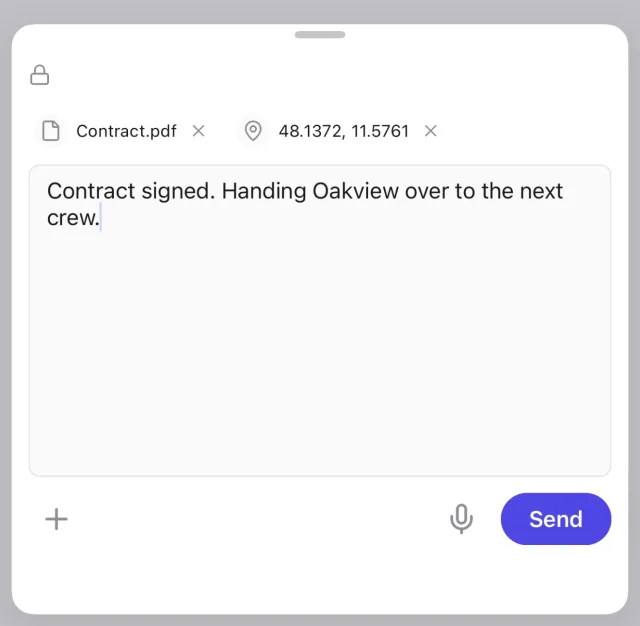
Submissions turn the phone into a one-tap endpoint for any script, server, or workflow. Nobody has to ask first. Open the app, pick a submission type, and send. A listener receives it within seconds. You can submit plain text, a photo straight from the camera, raw voice audio, your GPS location, or an arbitrary file.
Receiving submissions
Receiving requires your API token (app settings, under API Token). Pick the consumer that fits:
# block until the next submission arrives, print it, exit
sp collect --submissions --until count:1

# or watch them stream by
sp events --type submissionimport asyncio
from simplepush import Client
client = Client(api_token="YOUR_API_TOKEN", passwords="personal-secret")
async def main():
async for s in client.submissions():
if s.body:
print("text:", s.body.text)
if s.photo:
await s.photo.save("./inbox")
asyncio.run(main())import { Client } from "@simplepush/sdk";
const client = new Client({ apiToken: "YOUR_API_TOKEN", passwords: "personal-secret" });
for await (const s of client.submissions()) {
if (s.body) console.log("text:", s.body.text);
if (s.photo) await s.photo.save("./inbox");
}Getting the file
A photo, voice clip, or file is stored on the server, not included in the event. What arrives is metadata plus a way to fetch the bytes. In the SDKs that is a bound handle with save() and read(). Both fetch the file and decrypt it when you hold the key. On the CLI, --save-files does the same and adds the saved location to the JSON line as path. download_url() returns a presigned URL for your own HTTP stack instead. For an encrypted file that URL serves the raw ciphertext.
# download attachments into ./inbox as they stream in
sp collect --submissions --save-files ./inbox

# or fetch one afterwards: submission id + file id, both off the JSON line
sp download sbm_0193... sbf_0193... --out ./inboxasync for s in client.submissions():
if s.file:
print(s.file.filename, s.file.content_type, s.file.size)
path = await s.file.save("./inbox") # a directory keeps the file's own name
print("saved to", path)
data = await s.file.read() # or keep the bytes in memory
if s.audio:
await s.audio.save("./inbox")for await (const s of client.submissions()) {
if (s.file) {
console.log(s.file.filename, s.file.contentType, s.file.size);
const path = await s.file.save("./inbox");
console.log("saved to", path);
const data = await s.file.read();
}
if (s.audio) await s.audio.save("./inbox");
}A submission can carry more than one kind at once. Check photo, file, audio, and location separately rather than assuming one.
Receiving as an organization
When the sender is an organization member, the submission goes to the organization's stream instead of a personal one. Every member's submissions arrive on that one stream. Each submission carries the member as its actor, so a single consumer covers the whole team.
# once per machine: the CLI session doubles as the org credential
sp auth login

# no --api-token, so collect reads the organization's stream
sp collect --submissionsimport asyncio
from simplepush import OrgClient
org = OrgClient(api_key="YOUR_ORG_API_KEY",
master_key="BASE64_MASTER_KEY", master_key_version=1)
async def main():
async for s in org.submissions():
member = (s.raw.actor or {}).get("name")
print(member, s.body.text if s.body else None)
asyncio.run(main())import { OrgClient } from "@simplepush/sdk";
const org = new OrgClient({
apiKey: "YOUR_ORG_API_KEY",
orgMasterKey: masterKeyBytes, orgMasterKeyVersion: 1,
});
for await (const s of org.submissions()) {
console.log(s.actor?.name, s.body?.text);
}Encryption
In the app settings under Encryption, set your Personal Password and turn on submission encryption. Everything you submit is then encrypted on the device before upload. On the receiving side, supply that same password as your personal password (the bare string in passwords, or a bare -p secret on the CLI). Payloads are then decrypted automatically.
Organization members encrypt under the shared organization master key instead, so there is no personal password to configure. Pass the key to an OrgClient to decrypt what arrives. sp collect reads the key from the local vault and asks for the passphrase the first time it runs on a terminal. See Encryption.