Tasks
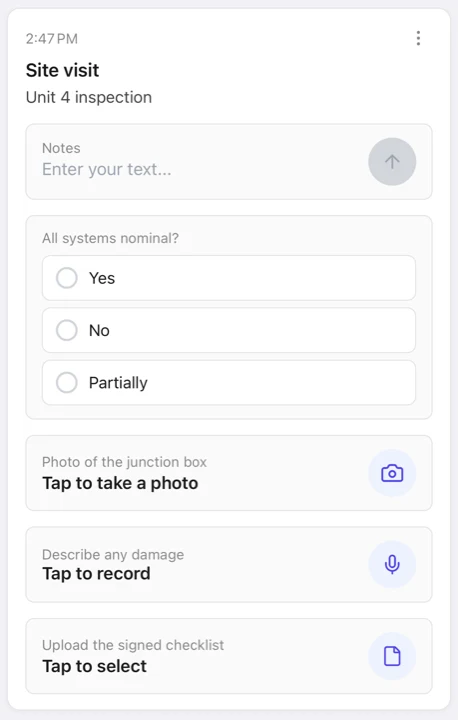
A task is delivered as a push notification and shown as a card in the app. The card stays until the task is handled. A task carries a title, content, attachments, and any number of inputs. Inputs are the questions the recipient answers with a tap, text, a number, a photo, a voice recording, a file, or their location. Every answer comes back to you as structured data. See Receiving Data.
Free accounts can put up to 5 inputs on a task, paying accounts up to 50. Uploaded answers (photos, voice, files) count against your storage pool.
API endpoint
POST /v1/tasks, authenticated with API-Token (personal) or Api-Key (organization). See the cURL guide for header-based sends. POST /v1/tasks/json is the same endpoint with a JSON body.
Delivery modes: independent (default) and shared
Sending to more than one recipient creates an independent task per recipient by default. Each instance has its own id, its own answers, and its own append token. The instances are tied together in a group. The send returns a grptsk_ group id with one tsk_ instance per recipient. This lets you ask twelve people the same question and know exactly who answered what.
Shared mode (shared=True / --shared / Shared: true header) is the alternative. It creates one task that all recipients see and answer together, and it is completed once. Use it when you want a single answer from whoever answers first, rather than one answer per person.
Inputs
Every input takes an optional description shown to the recipient and a required flag (default true). A required input must be filled before the task can complete. By default a task is a form. Recipients review and change their answers until they explicitly submit, and all answers arrive together. Enable auto-commit (--auto-commit on the CLI, Auto-Commit: true on curl, auto_commit=True / autoCommit: true in the SDKs) to deliver each answer as soon as it is filled in. The task then completes when all required inputs are done.
Text
A free-form text field, delivered back as a UTF-8 string.
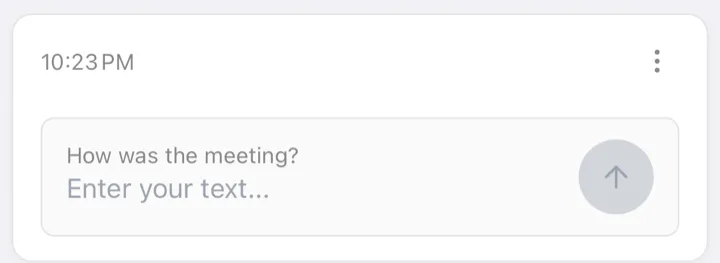
sp task -t standup --text-input "How was the meeting?"curl -X POST https://api.simplepu.sh/v1/tasks \
-H "API-Token: $SP_API_TOKEN" \
-H "Topic: standup" \
-H "Text-Input: How was the meeting?"from simplepush import Client, TextInput
client = Client(api_token="YOUR_API_TOKEN")
client.send_task(topic="standup", inputs=[TextInput(description="How was the meeting?")])import { Client } from "@simplepush/sdk";
const client = new Client({ apiToken: "YOUR_API_TOKEN" });
await client.sendTask({
topic: "standup",
inputs: [{ type: "text", description: "How was the meeting?", required: true }],
});Choice
A list of predefined options. The answer is the selected option and its index.
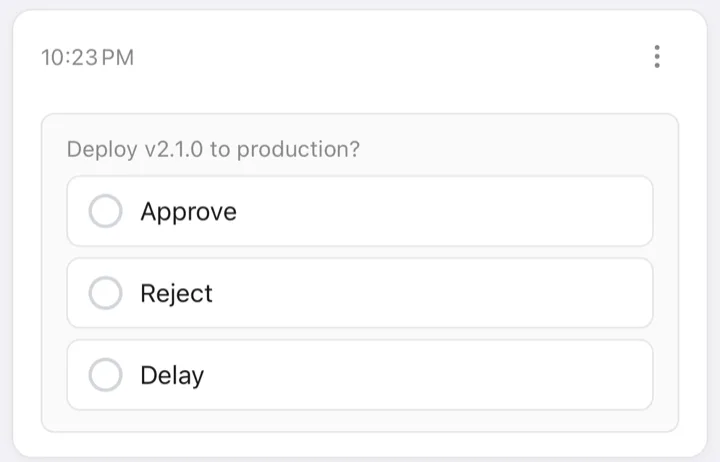
sp task -t deploys -c "Deploy v2.1.0 to production?;Approve,Reject,Delay"curl -X POST https://api.simplepu.sh/v1/tasks \
-H "API-Token: $SP_API_TOKEN" \
-H "Topic: deploys" \
-H "Choice-Input: Deploy v2.1.0 to production?;Approve,Reject,Delay"from simplepush import Client, ChoiceInput
client = Client(api_token="YOUR_API_TOKEN")
client.send_task(topic="deploys", inputs=[ChoiceInput(
description="Deploy v2.1.0 to production?",
options=["Approve", "Reject", "Delay"],
)])import { Client } from "@simplepush/sdk";
const client = new Client({ apiToken: "YOUR_API_TOKEN" });
await client.sendTask({
topic: "deploys",
inputs: [{
type: "choice",
description: "Deploy v2.1.0 to production?",
options: ["Approve", "Reject", "Delay"],
required: true,
}],
});Set multi=True (CLI: ;multi=true) to allow multiple selections. min_selections / max_selections optionally limit how many. A multi-choice never renders as tappable buttons on the notification. The recipient answers in the app. An optional multi-choice may be answered with no selection at all.
sp task -t deploys \
-c "Which services need the hotfix?;api,worker,scheduler,web;multi=true;minSelections=1;maxSelections=3"# The Choice-Input header is single-select only; multi goes through the JSON endpoint.
curl -X POST https://api.simplepu.sh/v1/tasks/json \
-H "API-Token: $SP_API_TOKEN" \
-H "Content-Type: application/json" \
-d '{
"topic": "deploys",
"inputs": [{
"type": "choice",
"description": "Which services need the hotfix?",
"options": ["api", "worker", "scheduler", "web"],
"multi": true,
"minSelections": 1,
"maxSelections": 3
}]
}'from simplepush import Client, ChoiceInput
client = Client(api_token="YOUR_API_TOKEN")
client.send_task(topic="deploys", inputs=[ChoiceInput(
description="Which services need the hotfix?",
options=["api", "worker", "scheduler", "web"],
multi=True,
min_selections=1,
max_selections=3,
)])import { Client } from "@simplepush/sdk";
const client = new Client({ apiToken: "YOUR_API_TOKEN" });
await client.sendTask({
topic: "deploys",
inputs: [{
type: "choice",
description: "Which services need the hotfix?",
options: ["api", "worker", "scheduler", "web"],
multi: true,
minSelections: 1,
maxSelections: 3,
required: true,
}],
});Actions
Buttons the recipient taps, for example Accept and Deny. Each action has a stable key that is reported back to you, a label shown on the button, and an optional style (default, primary, or destructive).
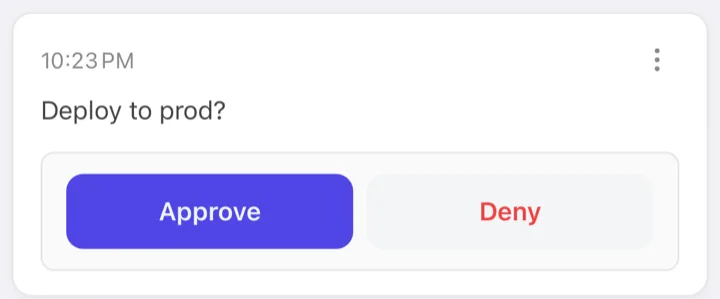
sp task -t deploys --content "Deploy to prod?" \
-a "approve=Approve:primary,deny=Deny:destructive"curl -X POST https://api.simplepu.sh/v1/tasks \
-H "API-Token: $SP_API_TOKEN" \
-H "Topic: deploys" \
-H "Content: Deploy to prod?" \
-H "Action-Input: approve=Approve:primary,deny=Deny:destructive"from simplepush import Client, ActionsInput, Action
client = Client(api_token="YOUR_API_TOKEN")
client.send_task(topic="deploys", content="Deploy to prod?", inputs=[ActionsInput(actions=[
Action(key="approve", label="Approve", style="primary"),
Action(key="deny", label="Deny", style="destructive"),
])])import { Client } from "@simplepush/sdk";
const client = new Client({ apiToken: "YOUR_API_TOKEN" });
await client.sendTask({
topic: "deploys",
content: "Deploy to prod?",
inputs: [{
type: "actions",
required: true,
actions: [
{ key: "approve", label: "Approve", style: "primary" },
{ key: "deny", label: "Deny", style: "destructive" },
],
}],
});Slider
The recipient picks a number on a [min, max] scale, for example a pool inspector logging pH on a 0 to 14 scale. min and max are required. step, unit, and a default position are optional. On an encrypted send the server never sees the scale.
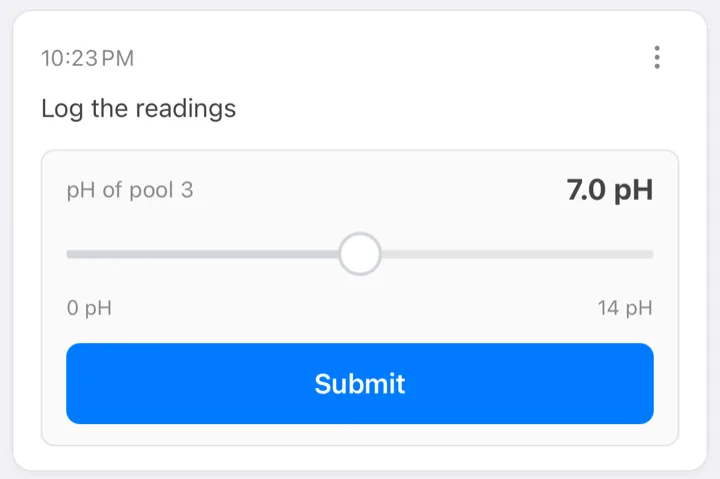
sp task -t pools --content "Log the readings" \
-s "pH of pool 3;min=0;max=14;step=0.1;unit=pH;default=7"curl -X POST https://api.simplepu.sh/v1/tasks \
-H "API-Token: $SP_API_TOKEN" \
-H "Topic: pools" \
-H "Content: Log the readings" \
-H "Slider-Input: pH of pool 3;min=0;max=14;step=0.1;unit=pH;default=7"from simplepush import Client, SliderInput
client = Client(api_token="YOUR_API_TOKEN")
client.send_task(topic="pools", content="Log the readings", inputs=[
SliderInput(description="pH of pool 3", min=0, max=14, step=0.1, unit="pH", default_value=7),
])import { Client } from "@simplepush/sdk";
const client = new Client({ apiToken: "YOUR_API_TOKEN" });
await client.sendTask({
topic: "pools",
content: "Log the readings",
inputs: [{
type: "slider",
description: "pH of pool 3",
min: 0, max: 14, step: 0.1, unit: "pH", defaultValue: 7,
required: true,
}],
});Photo, voice, file
Ask the recipient to take a picture, record their voice, or pick a file. The file is uploaded from their device. You receive it as a download: a presigned URL, or read()/save() in the SDKs.
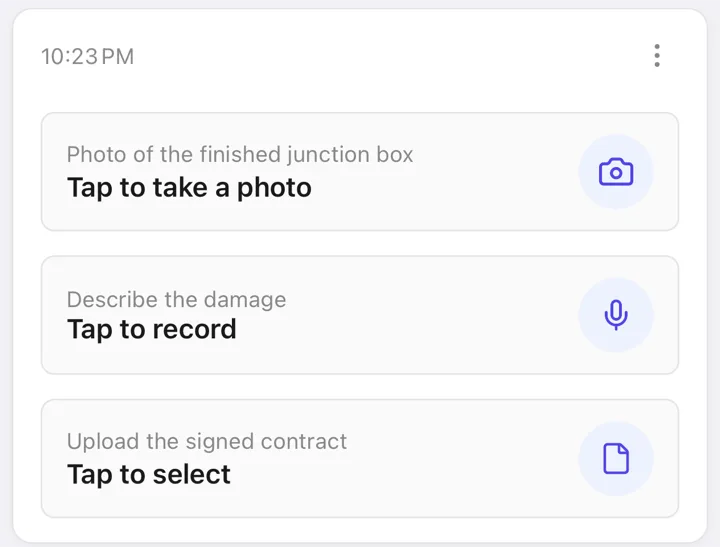
sp task -t site-crew \
  --photo-input "Photo of the finished junction box" \
  --voice-recording-input "Describe the damage" \
--file-input "Upload the signed contract"curl -X POST https://api.simplepu.sh/v1/tasks \
-H "API-Token: $SP_API_TOKEN" \
-H "Topic: site-crew" \
-H "Photo-Input: Photo of the finished junction box" \
-H "Voice-Recording-Input: Describe the damage" \
-H "File-Input: Upload the signed contract"from simplepush import Client, PhotoInput, VoiceRecordingInput, FileUploadInput
client = Client(api_token="YOUR_API_TOKEN")
client.send_task(topic="site-crew", inputs=[
PhotoInput(description="Photo of the finished junction box"),
VoiceRecordingInput(description="Describe the damage"),
FileUploadInput(description="Upload the signed contract"),
])import { Client } from "@simplepush/sdk";
const client = new Client({ apiToken: "YOUR_API_TOKEN" });
await client.sendTask({
topic: "site-crew",
inputs: [
{ type: "photo", description: "Photo of the finished junction box", required: true },
{ type: "voiceRecording", description: "Describe the damage", required: true },
{ type: "file", description: "Upload the signed contract", required: true },
],
});Location
The recipient shares their GPS position from the app. The answer carries the coordinates plus accuracy, altitude, heading, speed, and a timestamp when available.
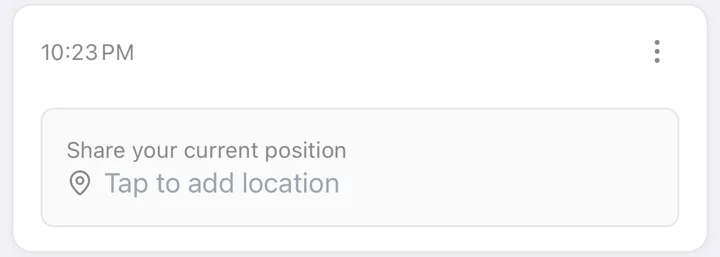
sp task -t field --location-input "Share your current position"curl -X POST https://api.simplepu.sh/v1/tasks \
-H "API-Token: $SP_API_TOKEN" \
-H "Topic: field" \
-H "Location-Input: Share your current position"from simplepush import Client, LocationInput
client = Client(api_token="YOUR_API_TOKEN")
client.send_task(topic="field", inputs=[LocationInput(description="Share your current position")])import { Client } from "@simplepush/sdk";
const client = new Client({ apiToken: "YOUR_API_TOKEN" });
await client.sendTask({
topic: "field",
inputs: [{ type: "location", description: "Share your current position", required: true }],
});Reply composer
Independent of inputs, a task can carry a reply composer. It is an open channel where recipients write back with text, photos, files, audio, or location, like a message thread attached to the task. There are three modes: one-shot (one reply closes it), sticky (stays open), and one-time-per-user (one reply per recipient). Collect replies with sp collect --replies or the handles' replies() streams.
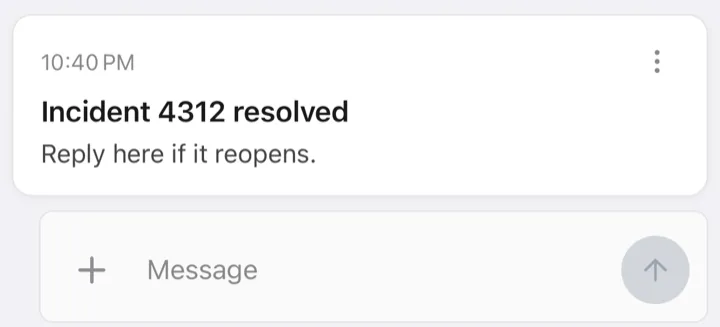
sp task -t oncall --title "Incident 4312 resolved" \
  --content "Reply here if it reopens." \
--reply stickycurl -X POST https://api.simplepu.sh/v1/tasks \
-H "API-Token: $SP_API_TOKEN" \
-H "Topic: oncall" \
-H "Title: Incident 4312 resolved" \
-H "Content: Reply here if it reopens." \
-H "Reply: sticky"from simplepush import Client, ReplyMode
client = Client(api_token="YOUR_API_TOKEN")
client.send_task(
topic="oncall",
title="Incident 4312 resolved",
content="Reply here if it reopens.",
reply=ReplyMode.STICKY,
)import { Client } from "@simplepush/sdk";
const client = new Client({ apiToken: "YOUR_API_TOKEN" });
await client.sendTask({
topic: "oncall",
title: "Incident 4312 resolved",
content: "Reply here if it reopens.",
reply: "sticky",
});Attachments
A task can carry link attachments (URLs, delivered as-is) and file attachments (uploaded with the send, downloaded by the recipient, encrypted when the send is encrypted).
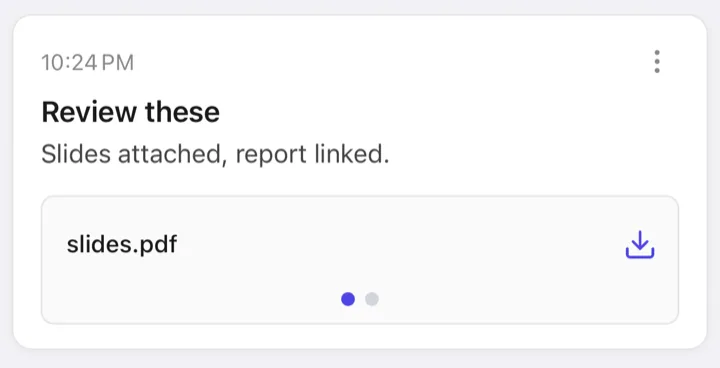
sp task --title "Review these" \
  --content "Slides attached, report linked." \
  -l https://example.com/report.pdf \
-f ./slides.pdf# Link attachments via the Attachment header; one file as the request body
curl -X POST https://api.simplepu.sh/v1/tasks \
-H "API-Token: $SP_API_TOKEN" \
-H "Title: Signed contract" \
-H "Content: Signed copy attached." \
-H "Attachment: contract.pdf" \
--data-binary @./contract.pdfclient.send_task(title="Review these",
content="Slides attached, report linked.",
links=["https://example.com/report.pdf"],
files=["./slides.pdf"])// files are FileAttachment objects: { filename, data: Uint8Array, contentType? }
await client.sendTask({
title: "Review these",
content: "Slides attached, report linked.",
links: ["https://example.com/report.pdf"],
files: [{ filename: "slides.pdf", data: bytes }],
});In the Attachment header, entries with a URL scheme (https://..., unifi-protect://...) are links. Any other entry names the file in the request body.
When the task's push carries no inline input, its first link becomes an Open link button on the notification. An https:// link opens the browser. An app's deep link opens that app.
Markdown
Pass --markdown (CLI) or content_format="markdown" / contentFormat: 'markdown' (SDKs) to render content as Markdown on the recipient's device. The format marker is never encrypted. This works for tasks and subtasks only. A notification is a push and always shows its body as plain text.
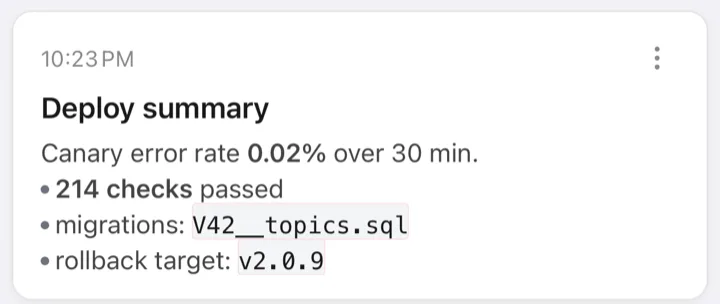
sp task --title "Deploy summary" --markdown --content "Canary error rate **0.02%** over 30 min.

- **214 checks** passed
- migrations: \`V42__topics.sql\`
- rollback target: \`v2.0.9\`"# The header path has no markdown flag; use the JSON endpoint.
curl -X POST https://api.simplepu.sh/v1/tasks/json \
-H "API-Token: $SP_API_TOKEN" \
-H "Content-Type: application/json" \
-d '{
"title": "Deploy summary",
"content": "Canary error rate **0.02%** over 30 min.\n\n- **214 checks** passed\n- migrations: `V42__topics.sql`\n- rollback target: `v2.0.9`",
"contentFormat": "markdown"
}'from simplepush import Client, ContentFormat
client = Client(api_token="YOUR_API_TOKEN")
client.send_task(
title="Deploy summary",
content=(
"Canary error rate **0.02%** over 30 min.\n\n"
"- **214 checks** passed\n"
"- migrations: `V42__topics.sql`\n"
"- rollback target: `v2.0.9`"
),
content_format=ContentFormat.MARKDOWN,
)import { Client } from "@simplepush/sdk";
const client = new Client({ apiToken: "YOUR_API_TOKEN" });
await client.sendTask({
title: "Deploy summary",
content: [
"Canary error rate **0.02%** over 30 min.",
"",
"- **214 checks** passed",
"- migrations: `V42__topics.sql`",
"- rollback target: `v2.0.9`",
].join("\n"),
contentFormat: "markdown",
});Priority
priority (1 to 5, default 3) sets how loudly the push interrupts, on tasks and subtasks alike. Level 4 gets through Focus and Do Not Disturb, level 5 also sounds on a muted phone. See Priority for the full table and every way to set it.
Send to your own devices
Omit the topic and the task goes to your own devices. Use this for a reminder, a checklist, or an agent asking you to approve something it is about to do. The send returns a single task. It is encrypted automatically with your personal password when your client has one configured.
Your API token is in the app settings under API Token. The CLI reads it from $SP_API_TOKEN or the --api-token flag. See Credentials.
export SP_API_TOKEN=YOUR_API_TOKENsp task --title "Reminder" --content "Water the plants"curl -X POST https://api.simplepu.sh/v1/tasks \
-H "API-Token: $SP_API_TOKEN" \
-H "Title: Reminder" \
-H "Content: Water the plants"client = Client(api_token="YOUR_API_TOKEN", passwords="personal-secret")
client.send_task(title="Reminder", content="Water the plants")import { Client } from "@simplepush/sdk";
const client = new Client({ apiToken: "YOUR_API_TOKEN", passwords: "personal-secret" });
await client.sendTask({ title: "Reminder", content: "Water the plants" });Follow-ups: subtasks
An existing task can grow. Append a subtask with new content and inputs using the append token from the send. Subtasks inherit the parent's recipients and encryption. They go one level deep only. See sp subtask.
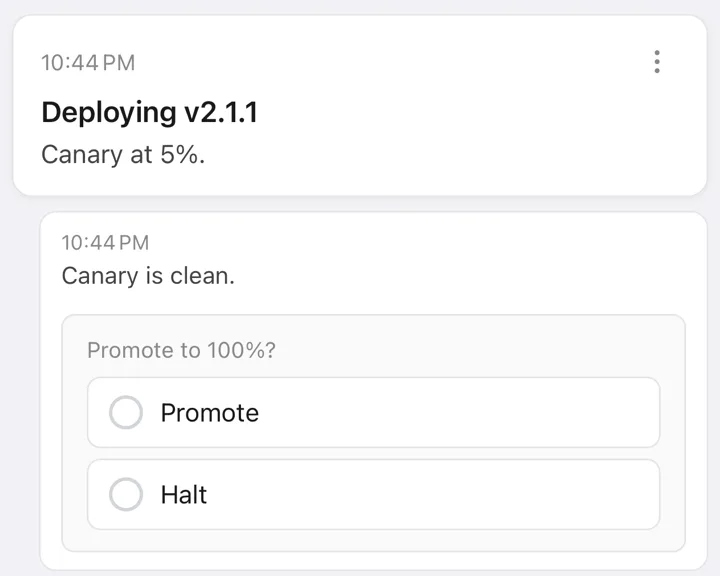
sp task -t deploys --title "Deploying v2.1.1" --content "Canary at 5%."
# → info: append token: at_...
sp subtask --append-token at_... \
  --content "Canary is clean." \
-c "Promote to 100%?;Promote,Halt"# A personal append authenticates with API-Token plus the append token.
curl -X POST https://api.simplepu.sh/v1/subtasks \
-H "API-Token: $SP_API_TOKEN" \
-H "Append-Token: at_..." \
-H "Content: Canary is clean." \
-H "Choice-Input: Promote to 100%?;Promote,Halt"from simplepush import Client, ChoiceInput
client = Client(api_token="YOUR_API_TOKEN")
task = client.send_task(topic="deploys", title="Deploying v2.1.1", content="Canary at 5%.")
task.append(content="Canary is clean.",
inputs=[ChoiceInput(description="Promote to 100%?", options=["Promote", "Halt"])])import { Client } from "@simplepush/sdk";
const client = new Client({ apiToken: "YOUR_API_TOKEN" });
const task = await client.sendTask({
topic: "deploys",
title: "Deploying v2.1.1",
content: "Canary at 5%.",
});
await task.append({
content: "Canary is clean.",
inputs: [{ type: "choice", description: "Promote to 100%?", options: ["Promote", "Halt"], required: true }],
});Canceling
The sender can withdraw a pending task. Recipients see the card marked as canceled and can no longer answer. A collector's stream ends with a canceled item. A task that was answered before the cancel arrived stays completed and rejects the cancel with task_already_completed. Canceling a task twice is harmless and does nothing.
A cancel carries an optional reason, rendered on the recipient's card:
canceled(default): plain withdrawal.answered: another recipient's answer made the rest unnecessary. This is the usual way to close an independent-mode group once the first useful answer arrives.superseded: a replacement exists.supersededBynames it. It is a task id, a subtask id of the same chain, or, on a group cancel, the replacement group id. On a group cancel, the server points each canceled instance at the replacement for its own recipient.
An optional free-text note for the recipients can be included. Subtasks cancel individually and leave the rest of the chain open. Canceling the root task closes the whole chain. A group cancel skips instances that have already finished instead of failing, and reports the counts.
sp cancel tsk_...

# tear down the rest of a group after the first answer
sp cancel grptsk_... --reason answered --note "already handled"
# → {"type":"canceled","groupId":"grptsk_...","canceled":2,"skipped":1}

# withdraw one follow-up, pointing at its replacement in the same chain
sp cancel sub_... --reason superseded --superseded-by sub_...curl -X POST https://api.simplepu.sh/v1/tasks/tsk_.../cancel \
-H "API-Token: $SP_API_TOKEN" \
-H "Content-Type: application/json" \
-d '{"reason":"answered","note":"already handled"}'group = client.send_task(topic="crew", content="Who can take this?", inputs=[TextInput()])
# ... first useful answer arrives ...
result = group.cancel(reason="answered", note="already handled")
print(result.canceled, result.skipped)const group = await client.sendTask({ topic: "crew", content: "Who can take this?" });
// ... first useful answer arrives ...
const { canceled, skipped } = await group.cancel({ reason: "answered", note: "already handled" });On an encrypted send the note is encrypted with the chain's key. The SDK handles do this automatically. sp cancel takes a --password (see sp cancel). Organization sends encrypt the note with the organization master key by default.
Declining
Declining is the recipient-side counterpart of canceling. A recipient can say that no answer is coming instead of filling the task. A decline carries a reason (declined, or failed for "I tried and couldn't") and an optional free-text note. The note is encrypted like a cancel note when the send is encrypted. Declining happens in the app's task menu. There is no send-side API for it.
For the sender, each decline arrives as its own declined item on the collector stream:
{"type":"declined","taskId":"tsk_...","actor":{"publicId":"usr_...","name":"Alice"},"reason":"failed","note":"printer is on fire","createdAt":"..."}A single decline does not end the task. A shared task stays open for the other recipients. Once every recipient has declined, the task becomes declined and the stream ends with an all-declined item. Independent-mode instances have one recipient each, so one decline is enough to mark them declined. Later answers from a recipient who declined are rejected with task_declined, so the count stays correct. A recipient who only deleted the task never counts as a decline. Subtasks decline separately and leave the rest of the chain open, like subtask cancels.
Expiry
Give a task a deadline and the server expires it for you. Once expiresAt passes and the task is still pending, the task becomes expired. Recipients can no longer answer, and a collector's stream ends with an expired item. No collector needs to be running. The task expires on the server either way.
# a duration from now, or an ISO 8601 timestamp
sp task -t deploys --content "Approve deploy?" -c "Approve,Deny" --expires 2hcurl -X POST https://api.simplepu.sh/v1/tasks -H "API-Token: $SP_API_TOKEN" -H "Topic: deploys" -H "Choice-Input: Approve deploy?;Approve,Deny" -H "Expires-At: 2026-08-09T18:00:00Z"from datetime import datetime, timedelta, timezone
group = client.send_task(topic="deploys", content="Approve deploy?",
inputs=[ChoiceInput(options=["Approve", "Deny"])],
expires_at=datetime.now(timezone.utc) + timedelta(hours=2))const group = await client.sendTask({
topic: "deploys",
content: "Approve deploy?",
inputs: [{ type: "choice", options: ["Approve", "Deny"], required: true }],
expiresAt: new Date(Date.now() + 2 * 3600_000),
});The deadline must be in the future and is soft. The task expires within about half a minute of the deadline, and an answer that arrives in that window still counts. After that, late answers are rejected with task_expired. For the client this is final, like task_canceled. Expiry never overwrites another outcome. A task that was answered, canceled, or declined first keeps that state, and its deadline no longer matters. Deadlines are set per task, on root tasks only. An expired root closes its whole chain, like a canceled one. In independent mode every instance carries the same deadline and expires on its own.
Encryption
Topic sends are end-to-end encrypted when a password is set for the topic. Titles, content, input descriptions, options, labels, slider scales, links, and file bytes are all encrypted before they leave your machine. See Encryption.